
Aadhaar Card Status – Check Enrolment & Update Status 2026
Keeping your Aadhaar Card updated is essential, as it is widely accepted by banks, schools, government departments, and other organisations for identity verification. UIDAI provides an official online facility that allows residents to check their Aadhaar Card Status and track enrolment or update requests, including address changes.
However, many applicants are still unaware of how to check their Aadhaar enrolment and update status online. If you are facing the same issue, this guide will help you step by step.
Aadhaar Enrolment & Update Status
Aadhaar Enrolment Status
After completing Aadhaar registration at an Aadhaar Enrolment Centre, Aadhaar Seva Kendra (ASK), or UIDAI enrolment centre, applicants receive a 28-digit Enrolment ID (EID number) on the acknowledgement slip. Aadhaar enrolment status usually shows results within 10 to 90 days, depending on document and biometric verification.
Aadhaar Update Status:
When an applicant submits a request to update their Aadhaar card, such as changing the address, mobile number, correcting the name, or updating the photo through the My Aadhaar portal, SSUP portal, or at a UIDAI centre, they receive an URN (Update Request Number) or EID. This number helps users to check the status of the update request wether it is completed, pending or under verification. Typically, this process takes 10-30 days.
Both Aadhar enrolment status checking and Aadhar card update tracking are completely free. UIDAI provides multiple platforms like the UIDAI website, My Aadhaar portal, UMANG app, and more to securely check the status of enrollment and update request any time.
What You Need to Check Aadhaar Status & Enrolment
Before checking your Aadhaar enrolment and status online via the portal or sms, make sure you have the following details ready.
Methods to Check Aadhaar Enrolment and Update Status
UIDAI provides 4 easy and reliable ways to check aadhar card status online and offline. New applicants can track their Aadhaar enrolment, while existing users can check their Aadhaar status by using the following services.
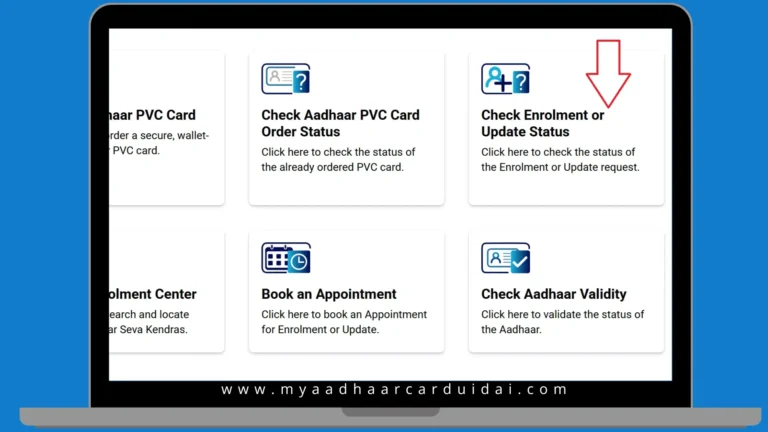
1. UIDAI Website (myAadhaar Portal)
MyAadhaar UIDAI portal is a dedicated platform for checking Aadhaar and enrolment status.
Here is step by step guide:
 |
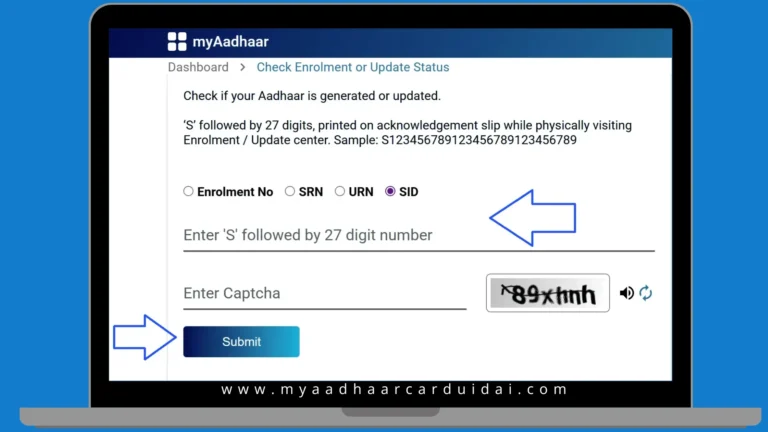 |
Note: The Aadhaar card is usually generated within 10 to 90 days. You will receive an SMS or email once your Aadhaar is successfully generated. |
2. mAadhaar App
The Unique Identification Authority of India (UIDAI) offers the mAadhaar mobile app as a convenient option for smartphone users. The app is available for download on both the Google Play Store and Apple App Store, allowing users to check their Aadhaar details and status easily.
Here is the step-by-step guide:
Note: If your Aadhaar is generated, log in to the app using OTP to view and download your Aadhaar Card (e-aadhaar). |
3. UMANG App
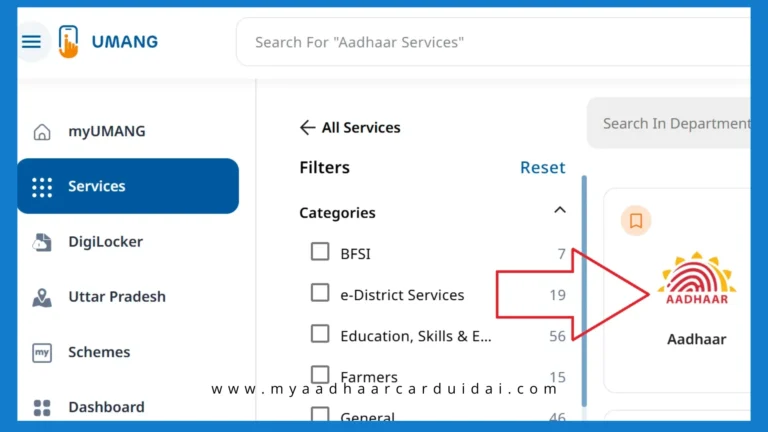
The UMANG mobile application is an official digital initiative of the Government of India designed to bring multiple public services on a single platform. It is built and maintained under the guidance of the Ministry of Electronics and Information Technology (Meit) in collaboration with the National e-Governance Division (NeGD). The app allows users to check Aadhaar enrolment status and Aadhaar update status with ease.
Steps to check status and enrolment using the UMANG App.
 |
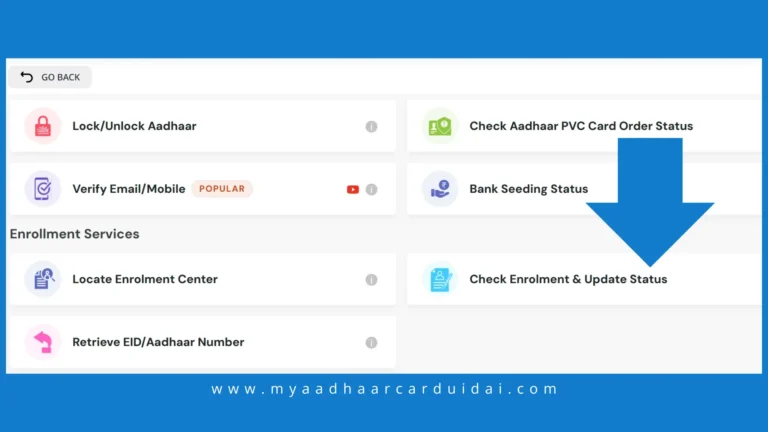 |
Note: If you want to download your e-Aadhar using the UMANG App, follow the simple steps displayed on the screen. |
4. Check Aadhaar Status via Toll-Free Number
Users without internet access can check their Aadhaar Card Status by calling the UIDAI helpline 1947 or using the official SMS service from their registered mobile number.
Follow these steps to check enrolment and status using the Toll-Free Number.
Helpline Timings: |
Note: You can also talk to customer support for your Aadhaar status and enrolment confirmation. |
What to Do If You Lose Your Aadhaar EID or URN
If your Enrolment ID (EID) or Update Request Number (URN) is misplaced, you can retrieve it easily using the official UIDAI online portal. These reference numbers are essential for tracking your Aadhaar enrolment status or Aadhaar update status, so recovering them allows you to continue checking your Aadhaar Card Status without any interruption.
Steps to recover EID or URN:
- Visit myaadhaar.uidai.gov.in
- Click on Retrieve EID/Aadhaar Number.
- Enter your details such as full name, email address, and registered phone number.
- Fill in the Captcha code and click on Send OTP.
- After verifying your phone number using OTP, your EID or URN will be sent via sms or email.
Note: If you encounter any error while recovering your EID or URN, contact the helpline (1947) immediately.
Conclusion:
Users can now easily check, update and edit their details like phone number, photo and address using the online services of UIDAI. You can track your Aadhaar card status, enrolment status, and Aadhaar renewal online using the Umang app, mAadhaar app or the official myaadhaar portal.