
Download Aadhaar Card By Name or Aadhaar Number in 2026
Once your Aadhaar enrolment or update status shows “Aadhaar Generated”, you can move ahead and access your digital copy online. This process starts on the official My Aadhaar portal managed by the Unique Identification Authority of India. From there, users can verify and confirm when the e-Aadhaar is ready. If it’s ready, users can get the digital version on the spot. It is called e-Aadhaar and is a secure and legally valid PDF accepted wherever a physical card is required.
In this guide, we explain when and how to download Aadhar card PDF online, including how to download Aadhar card with mobile number and see ways to get one without mobile number if you’re overseas. Each method is explained clearly below.
Download Aadhaar Card
Get your Aadhaar digitally through official UIDAI platforms. Here are the Indian government’s official options.
What is e-Aadhaar?
e-Aadhaar is a password-protected digital copy of your Aadhaar card. Just like Aadhaar, e-Addhaar is issued by the Unique Identification Authority of India (UIDAI). It contains all the information of the physical Aadhaar card, including your 12-digit Aadhaar number, name, date of birth, gender, address, photograph, and linked biometric data.
Under the Aadhaar Act 2016, e-Aadhaar is legally valid and must be accepted as proof of identity and address across India. You can download e Aadhaar as a PDF anytime through the official UIDAI portal or the mAadhaar app (or through any of the under-given methods). Choose between a Regular Aadhaar, showing the full number, or a Masked Aadhaar, displaying only the last four digits. To open the file, a password is required, combining the first four letters of your name in uppercase and your birth year.
e-Aadhaar Vs Physical Aadhaar Card
| Feature | e-Aadhaar | Physical Aadhaar Card |
| Accessibility | Download e Aadhaar anytime, anywhere | Delivered once by post |
| Security | Password-protected PDF | Can be lost or damaged |
| Acceptance | Accepted everywhere | Accepted everywhere |
| Re-issuance | Free multiple downloads | Reprint requires a fee |
Requirements for Free Aadhaar Card Download
To download Aadhaar card online, some requirements apply across the UIDAI website and official Aadhaar apps. Having them ready avoids failed attempts or verification delays.
Step-by-Step Methods for Aadhaar Card Download
We’ve compiled six valid methods recognised by UIDAI and government platforms. Each method follows a verified and secure process and works within UIDAI rules. Choose the option that fits your situation:
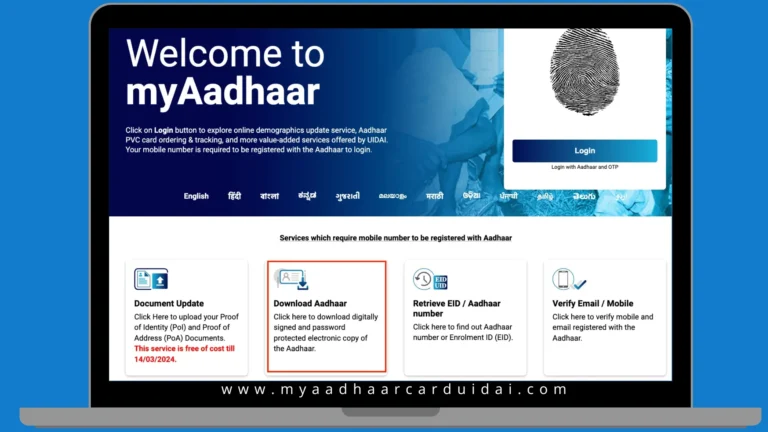
1. Download Aadhaar Card via UIDAI Website (myAadhaar Portal)
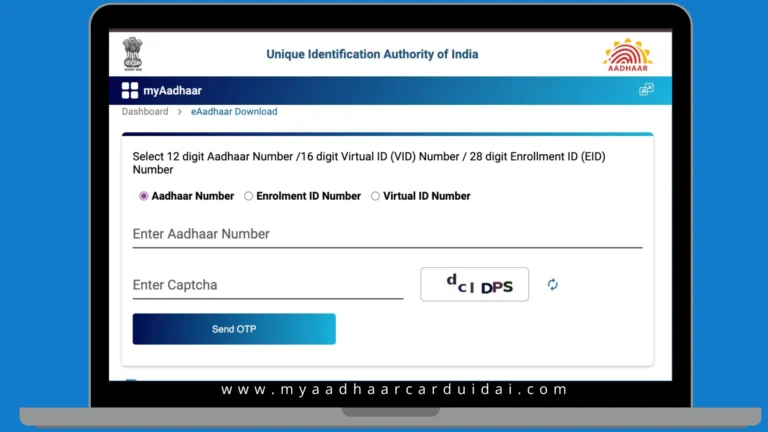
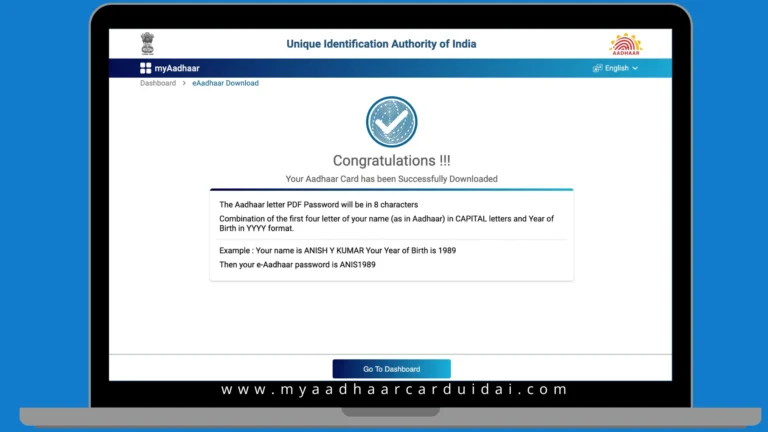
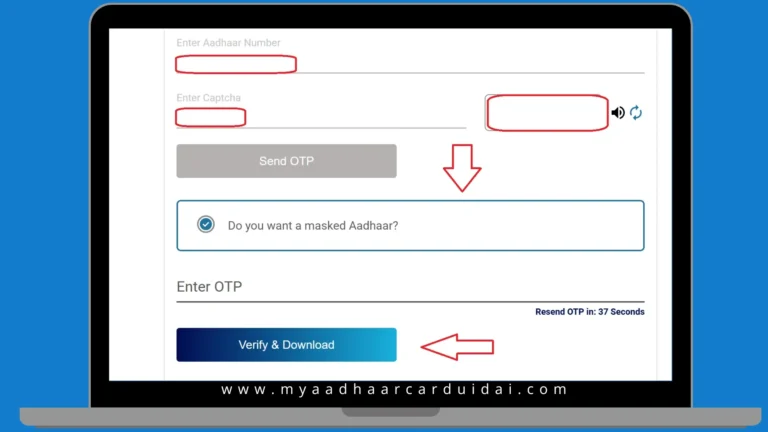
This is the primary and most reliable method provided by UIDAI. It works for users who have a mobile number linked to Aadhaar and want a direct online e-aadhaar download without using third-party platforms. Here is the standard UIDAI Aadhaar download process:
 |
 |
 |
Note! |
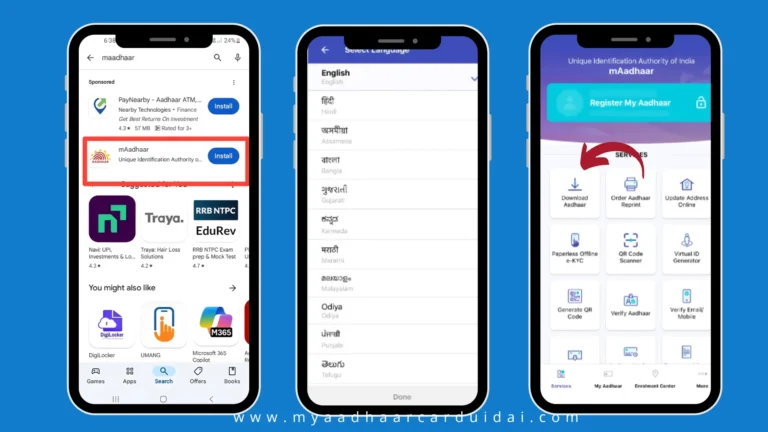
2. Download Aadhaar Card Using mAadhaar App
The mAadhaar app is useful for users who prefer mobile access and want Aadhaar stored on their phone. The app allows up to three profiles per mobile number, making it useful for families.
 |
Note! |
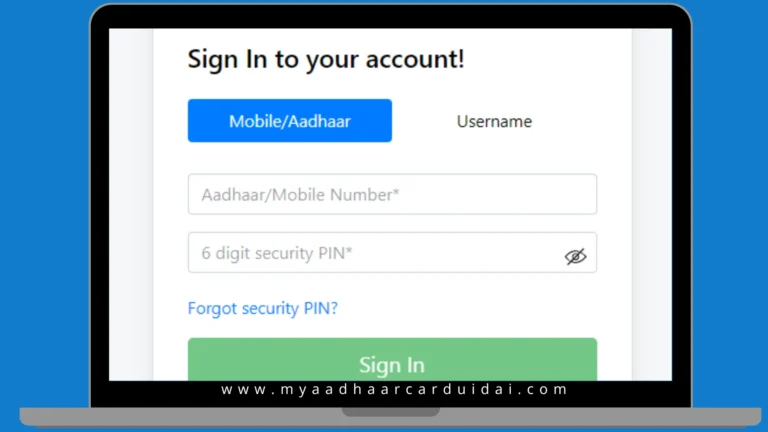
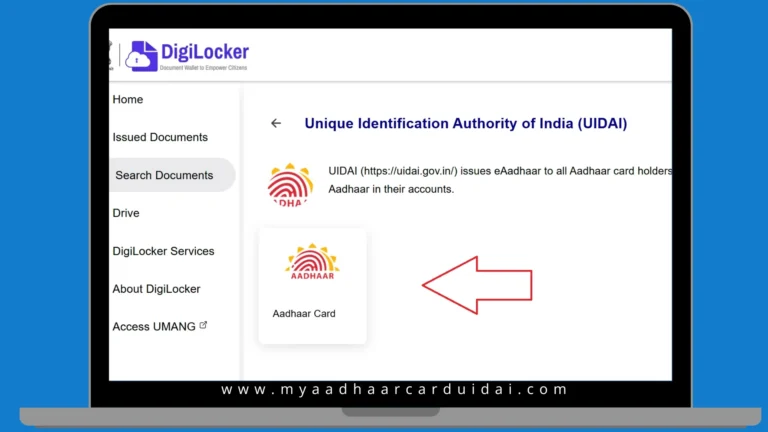
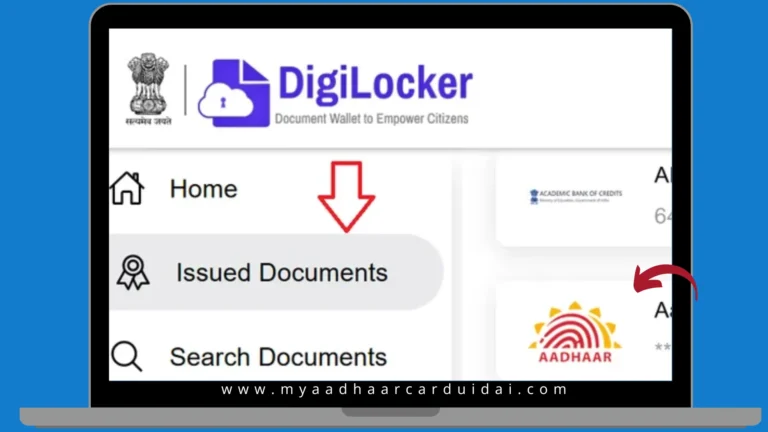
3. Download Aadhaar Card via DigiLocker
DigiLocker allows Aadhaar access through a secure government-backed document vault. It is useful for users who already store official records digitally and want Aadhaar alongside them. Follow these steps:
 |
 |
 |
4. Download Aadhaar Card Using Name and Date of Birth
This method helps users who do not remember their Aadhaar number or Enrolment ID (EID). It does not download Aadhaar directly but allows retrieval of required details to continue with official download methods. Do this:
Note! |
5. Download Aadhaar Card Without Registered Mobile Number (Offline)
If your mobile number is not linked, physical verification is mandatory at an Aadhaar centre. Here’s how to download Aadhaar card when no mobile number is linked to Aadhaar:
Note! |
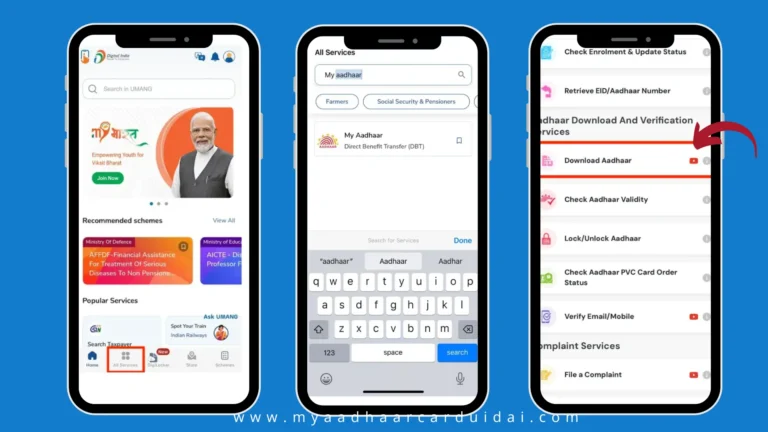
6. Download Aadhaar Card via UMANG Portal
UMANG offers Aadhaar services within a broader government services platform. It is suitable for users already registered on UMANG. Follow this:
 |
What’s the Password to open the e-Aadhaar PDF?
The e-Aadhaar PDF is password-protected document, so your personal information stays secure. The Aadhaar card password is an 8-character combination. The first four letters of your name in uppercase, followed by your birth year in YYYY format. Confused? Here’s an example of e Aadhaar password formats:
- Name: Sameer Sarkar, Birth Year: 1990, pass: SAME1990
- Name: Raj Yadav, Birth Year: 1988, pass RAJY1988
- Name: Ria Sharma, Birth Year: 1990, pass RIAS1990
To open your e-Aadhaar:
- Use a PDF reader such as Adobe Acrobat or Microsoft Edge.
- Enter the password to open Aadhaar PDF as per the format above.
- If the password does not work, verify your name and birth year against your UIDAI records.
How to print your e-Aadhaar?
Once you complete your digital Aadhaar card download, you can print it for physical use. The hard copy of e-Aadhaar is legally valid and can be used just like the physical card. You may also request a PVC Aadhaar card from UIDAI by paying a small online fee. Here are the steps:
- Use a PDF reader such as Adobe Acrobat or Microsoft Edge.
- Enter the password as told above.
- Choose the number of copies and ensure your printer is connected.
- That’s it! Get the physical copies.
You can get print at the Aadhaar Centre for ₹30 after biometric authentication. You can also get Aadhaar PVC Card for ₹50 (includes GST and speed post). It’ll be delivered to your registered address within a week.
How to Download Masked Aadhaar?
A masked Aadhaar hides the first eight digits of your 12-digit Aadhaar number, showing only the last four digits. This is best for ensuring privacy while retaining legal validity. Useful for KYC, rentals, or identity verification without exposing the full Aadhaar number. Here are the steps for UIDAI masked Aadhaar card download:
- Visit the My Aadhaar portal.
- Click Download Aadhaar under “My Aadhaar” services.
- Enter your Aadhaar number, enrolment ID, or VID and the captcha code.
- Select Masked Aadhaar to hide the first eight digits.
- Click Send OTP and verify using the code received on your registered mobile.
- Download the masked Aadhaar PDF.
- Open it using the standard password format.
Digital Aadhaar Features &Benefits
The main feature of e-Aadhaar is digital convenience. Here are several benefits of e-Aadhaar, making identity management simpler and safer.
Download Aadhaar Card: Tips from Online Forums
Users on Reddit, Quora, and other forums share real-life methods to download Aadhaar card. These approaches are not official but have worked for many. Here are practical tips covering overseas access, lost Aadhaar, duplicate downloads, OTP issues, browser problems, and full-detail printable copies.
Download Aadhaar Card Outside India
NRIs report official UIDAI portals may block access based on IP location. Using a VPN with an Indian server usually allows login. Digilocker also works abroad with an Indian mobile number for OTP. Keep a physical copy when visiting India as a backup.
Reprinting Aadhaar Card
Many note that the old reprint option is no longer visible. UIDAI now provides unlimited requests for physical PVC cards or digital e-Aadhaar. Residents can request a new Aadhaar card download (through above methods) or reprint multiple times. Damaged, lost, or outdated cards can be replaced conveniently without limit.
Duplicate Aadhaar Card Download
To get a duplicate Aadhaar card download, log in at uidai.gov.in, use Digilocker, or the mAadhaar app. Lost numbers can be recovered through biometric verification at enrollment centers or via UIDAI helpline. Never attempt to apply for a “new” number unnecessarily.
Download Without Registered Mobile or OTP
If you no longer have your registered mobile, OTP-based e-Aadhaar download fails. Forums report UIDAI allows online reprint of Aadhaar for Rs. 50. Enter Aadhaar details, provide any current mobile number for OTP verification, and receive the card by post, making this suitable for those without old phones.
Solving Download Errors
Some users see “download successful” but cannot locate the file. Switching browsers to Chrome or Firefox usually works. On mobile, check default download folders or Files app. Apps like mAadhaar or Digilocker often bypass browser issues, ensuring a reliable Aadhaar card download experience.
Printable Aadhaar Card with All Details
Downloaded Aadhaar sometimes masks details. Selecting “unmasked Aadhaar” on UIDAI ensures the digital copy includes all information. This version can be printed and used for official purposes.